Posts

Opening portlet in popup

  Sometimes, we may get requirements to open portlet in a popup. We can use below Javascrpit function to open in apopup. AUI().use('aui-base','aui-component','aui-parse-content','aui-node','liferay-form',     'liferay-portlet-url', 'liferay-util-window', 'plugin','aui-io-request', function(A){                    var renderURL = Liferay.PortletURL.createRenderURL();       renderURL .setWindowState("exclusive");        renderURL.setPortletId(" <portlet-name> ");       var  url = renderURL.toString();             A.io.request(url, {                 on: {                  success: function(event, id, obj) {                        var responseData = this.get('responseData');   ...

Redirecting Post Values from Third Party application to Liferay

  Whenever we do Post in Liferay, Liferay will auto generate P_auth token.  But whenever we are doing posting(Post Request) from third party application and redirecting to Liferay application ,  liferay application will expect p_auth token. But third party applications cannot provide p_auth as it is Liferay specific.  But in liferay, we can design to ignore p_auth token for specific URL. First , Write a below class to ignore Auth token for specific URL @Component( immediate = true, property = { "auth.token.ignore.mvc.action=true", "javax.portlet.name=" + SamplePortletKeys.PortletName, "mvc.command.name=/redirect/liferay" }, service = MVCActionCommand.class ) public class RedirectPath extends BaseMVCActionCommand { } Here we have created MVCActionCommand Class  auth.token.ignore.mvc.action=true                This Property will ensure to ignore p_auth token.      2.  "mvc.com...

Run geckodriver before launching the browser

  Inorder to launch empty firefox browser,just create a object to browser class,it automatically launches a browser,bcoz constructor has the code to launch empty browser. get() is used to navigate to any web application URL,but URL should start with "http:" or "https:" Note: Webdriver internally uses http or https protocol for browser communication. Example as below: import org.openqa.selenium.firefox.firefoxDriver; public class SampleFirstTest {               System.setProperty("webDriver.gecko.Driver",c://....path u should give");              FirefoxDriver driver=new FirefoxDriver();              driver.get("https://facebook.com");    } Webdriver basic Browser operation:      get()    navigate().to()    navigate().refresh();    navigate().back()    navigate().forward()    f...

Organization Administrator and Organization Owner

Image
In Liferay, we can assign the users to the Organization and can assign the Organization role to the users. There are 3 types of organization roles . After assigning the role ,  If we want to fetch the users who has the Organization administartor. Below is the code. long orgId = ParamUtil.getLong(request, "organizationId"); List<User> users = OrganizationUtil.getUsers(orgId); Group organizationGroup = OrganizationLocalServiceUtil.getOrganization(orgId).getGroup(); for(User user: users){   long organizationGroupId = organizationGroup.getGroupId();   if (UserGroupRoleLocalServiceUtil.hasUserGroupRole(   user.getUserId(), organizationGroupId, RoleConstants.ORGANIZATION_ADMINISTRATOR)) {                   System.out.println("User is: "+ user);                           ...

Theme display in javascript

We know that we can access the themedisplay in java as ThemeDisplay themeDisplay = (ThemeDisplay) request.getAttribute(WebKeys.THEME_DISPLAY) But how can we access in javascript? Here we go Liferay.ThemeDisplay.getScopeGroupId() Liferay.ThemeDisplay.getCompanyId() Liferay.ThemeDisplay.getPlid() Liferay.ThemeDisplay.getLayoutId() By this we can access the groupId, companyid ... etc

Get Text from language properties via javascript

We know that we can get the text from the properties as   Language.properties     you-have-processed-sucessfully = Your Request processed successfully.   JSP: <liferay-ui : message key = "you-have-processed-sucessfully" /> CLASS: LanguageUtil . get ( pageContext , " you-have-processed-sucessfully " ); But if want to retrieve via javascript , Here is the one <script>      <custom code> ---               ----     Liferay . Language . get ( ' you-have-processed-sucessfully ' ); </script> But this Liferay.Language will get from the Portal properties not from the portlet properties There is way to solve this problem writing Hook and specifing the properties.

Introduction to Selenium

Image
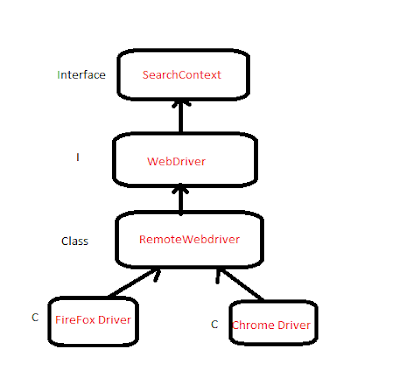
Selenium is a free (open source) automated testing suite for web applications across different browsers and platforms. Different languages support by selenium Java PHP Perl Python C# ObjectC Ruby Javascript Selenium Versions Selenium IDE ( I ntegrated D evelopment E nvironment) Selenium RC ( R emote C ontrol) Selenium Webdriver Latest version is  Selenium Webdriver Selenium IDE  Implemented by shinya from JAPAN  Released in 2006  Functional  Automation tool supports only webapplications It is UI based and record/playback tool It is implemented plugin or add-on for the firefox browser Supports only firefox browser Selenium RC Implemented  by jsonhuggins from thoughtwork company Released in 2004 First automation open-source tool in the market It is Collections of javascript's. It's not a UI based, it doen't contain record/playback feature It Supports all browser and platform's Selenium Webdriver I...

Introduction to Automation

What is Automation A process of converting any manual test case into automation test scripts using some automation tools with scripting or programming language is called automation. Automation tools QTP [VB] - Scripting language Selenium : IDE[HTML] Webdriver : [JAVA/.NET/Perl/python] Commerical tools - Paid/Licenced based tools (QTP) OpenSource - Source code is avaliable in internet (webdriver) Freewar : Source Code is not avaliable but is freely avalible in internet (Playstore, SOAP UI) Types of Applications:   Web Applications: Any application uses browser or URL to open like GMail,FB,Flipkar  Standalone Applications: The Application which doesn't uses browser or URL to open like           M.S.Excel, Notepad Mobile Applications:  The Application which opens through Mobile. Under mobile Applications we have Native:Default applications available in Mobile ex: Contacts, Message.  Web: Application...

Service Bulider SQL Types

Service-Builder provides flexibility to map Java data types into SQL data types as follows: <column name="type" type="String" /> <column name="type" type="long" /> <column name="answerOrder" type="int" /> Java data type                     SQL data type                   Description boolean, Boolean                 BOOLEAN                            Boolean type Double, Double                    DOUBLE                               Double type float, Float                            FLOAT                      ...

Details about Site roles - Adding and getting

Related to Site Roles we can use  UserGroupRoleLocalServiceUtil method. To add site role to the user we can use  UserGroupRoleLocalServiceUtil .addUserGroupRoles(long userId, long groupId, long[] roleIds) To get site role for the user we can use getUserGroupRoles( long userId, long groupId); Also there are several methods to Delete site roles and to check the site roles. All these implementation we can check in the  UserGroupRoleLocalServiceImpl .

Running Custom SQL

In Liferay by default , ServiceBuilder generated LocalServiceBaseImpl class contains a method call runSQL. We can use that method to execute our CustomSQL Query of that Entity. If we want to execute the customSQL of Blogs Entity we can use that method by call in the localserviceImpl. Example: 1. I have a table call " Employee " and i want to execute the Employee table  related custom SQL 2. So i have written a custom method in EmployeeLocalServiceImpl  as below and calling runSQL method  public void executeCustomQuery(String cusQuery) throws SystemException{ super.runSQL(query); } 3. Build the service and call the sql query as  EmployeeLocalServiceUtil.executeCustomQuery(' update table Employee set EmpName = 'Liferay' where EmpId = 2 '); So here it is , We can Execute the SQL queries

Getting the modal hints for the column in class

We will update the maxlength for the column in portlet-modal-hints.xml. Just like as below <field name="comments" type="String"> <hint name="max-length">500</hint> </field> If we want to get these max length in the class,  we can use the below code. ModelHintsUtil.getMaxLength(model, field) model : Class name field : columnName ex: ModelHintsUtil.getMaxLength(KBUser.class.getName(), "comments");

Debug the Mail in liferay

To turn on logging of Liferay mail and JavaMail, add the following to your Log4j configuration in  webapps/ROOT/WEB-INF/class/ META-INF/portal-log4j-ext.xml  after the last  <appender>  entry: <logger name="com.liferay.util.mail"> <level value="DEBUG"/> </logger>

Analyzing the Portlet Performance in liferay

Set the following log in the  tomcat/lib/META-INF/portal-log4j-ext.xml <category name="com.liferay.portlet.InvokerPortletImpl">        <priority value="DEBUG" />     </category> This will cause the performance of each portlet render to be logged, for example:  render for welcomeportlet_WAR_welcomeportlet takes 1 ms render for employmentportlet_WAR_linksportlet takes 80 ms

Difference between System Exception and Portal Exception

SystemException  This  Exception caused by system problems. Examples include database connection errors and file not found errors.   System exceptions are always unexpected , and generally indicate that the   portal is misconfigured or that a critical service is unavailable. PortalException  This exceptions related to business logic. Examples include invalid input, portlet errors, and references to non existent database records.   Portal exceptions are generally caused by user error , and do not indicate that anything is wrong with the portal itself.

Creating the URL programmtically

Hi, Below is the code ,to create the different types of request URL. As we know in Liferay we have 3 types of URL 1.ActionRequest 2.RenderRequest 3.ResourceRequest. //Create Render URL PortletURL renderURL = PortletURLFactoryUtil.create( actionRequest,PortalUtil.getPortletId(actionRequest), themeDisplay.getLayout().getPlid(), "0"); renderURL.setParameter("customparam","customvalue"); actionResponse.sendRedirect(renderURL.toString()); If you want to create the ActionRequest put 1 instead of 0 in the last argument. We can check the code in the  PortletURLImpl class of liferay if (_lifecycle.equals(PortletRequest.ACTION_PHASE)) { _reservedParameters.put("p_p_lifecycle", "1"); } else if (_lifecycle.equals(PortletRequest.RENDER_PHASE)) {

Liferay Input Move boxes

Image
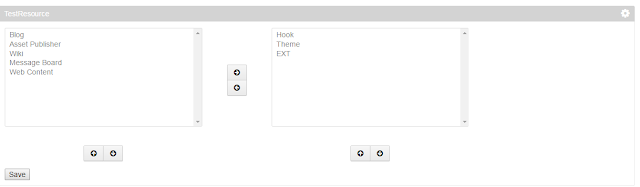
In Liferay we have one more taglib called input-moveboxes , where we can move the items from left to right viceversa. Which can be look like as below, Here the Code, <%@page import="com.liferay.portal.kernel.util.KeyValuePair"%> <%@page import="java.util.ArrayList"%> <%@page import="java.util.List"%> <%@ taglib uri="http://java.sun.com/portlet_2_0" prefix="portlet" %> <%@ taglib uri="http://liferay.com/tld/ui" prefix="liferay-ui" %> <portlet:defineObjects /> <% List<KeyValuePair> leftList = new ArrayList<KeyValuePair>(); leftList.add(new KeyValuePair("1", "Blog")); leftList.add(new KeyValuePair("2", "Asset Publisher")); leftList.add(new KeyValuePair("3", "Wiki")); leftList.add(new KeyValuePair("4", "Message Board")); leftList.add(new KeyValuePair("5", ...

Steps to follow to deploy/undeploy the EXT

As we know that EXT is not hot deployable , we need to restart the server whenever it is deployed. At first time we can deploy the EXT without any prob, but when we need to redeploy or undploying the EXT following things need to be followed. 1. Stop the tomcat server 2. Delete the temp and work folder of tomcat server. It will be reside in the <tomcat-home>. Probably it can as  liferay-portal-6.2.10.1-ee-ga1\tomcat-7.0.42\temp and  liferay-portal-6.2.10.1-ee-ga1\tomcat-7.0.42\work. 3. Make sure to delete the JAR files created when EXT is deployed. All the jar files will be created with name prefix as ext . Jar files will be at <tomcat-home>/lib/ext it can  liferay-portal-6.2.10.1-ee-ga1\tomcat-7.0.42\lib\ext.                 ext-*-ext-service.jar Also it can also be at <tomcat-home>/ROOT/WEB-INF/lib/ probably it can be as  liferay-portal-6.2.10.1-ee-ga1\tomcat-7.0.42\webapps\ROOT\WEB-...

UnderStanding the Resource Permission

This article explains about the basic flow of the resources, how they are applied. 1. Create the Portlet with the Name as "TestPermission" 2. Create service.xml <?xml version="1.0" encoding="UTF-8"?> <!DOCTYPE service-builder PUBLIC "-//Liferay//DTD Service Builder 6.2.0//EN" "http://www.liferay.com/dtd/liferay-service-builder_6_2_0.dtd"> <service-builder package-path="com.service"> <author>Test</author> <namespace>Test</namespace> <entity name="Bus" local-service="true">         <column name="id" type="long" primary="true"></column>         <column name="registration" type="String"></column>         <column name="wheels" type="String"></column>     </entity> </service-builder> Build the services, automatically classes w...

Working with Alloy UI Taglibs

Image
We can use readly avalible taglibs in our customportlet , Here are the some 1. If we want user to rate the content we can use "ratings" taglib as, <liferay-ui:ratings classPK="12724" className="<%=BlogsEntry.class.getName() %>"></liferay-ui:ratings> Here classPK is the  primarykey , here i am using the blogsentry so it is blogsentryid className is the classname of the entry, wheather it is "BlogsEntry" , "JournalArticle" etc. 2. If we want to display the rating score <liferay-ui:ratings-score score="2"></liferay-ui:ratings-score> 3. "Discussion" taglib mostly used to display the user comments <liferay-ui:discussion classPK="12724" userId="10201" className="<%=BlogsEntry.class.getName() %>" formAction="fm"></liferay-ui:discussion> Here classPK is the  primarykey , here i am using the blogsentry so it is...