Posts

Showing posts with the label session

Getting the user password

In Liferay, We know that user password stores in Encrypted format in DB but sometime we have want to know the user password. so what to do?? We have utility method portalUtil.getUserPassword(portalRequest); But it gives null value. So how do we get it? Add the following properties in the Portal-ext.properties and restart the server. session.store.password=true session.shared.attributes.excludes= Then use the portalUtil.getPassword to get the userPassword. Thats it!!!  Now we can view the user password.
Extending the session/jsessionId

Image
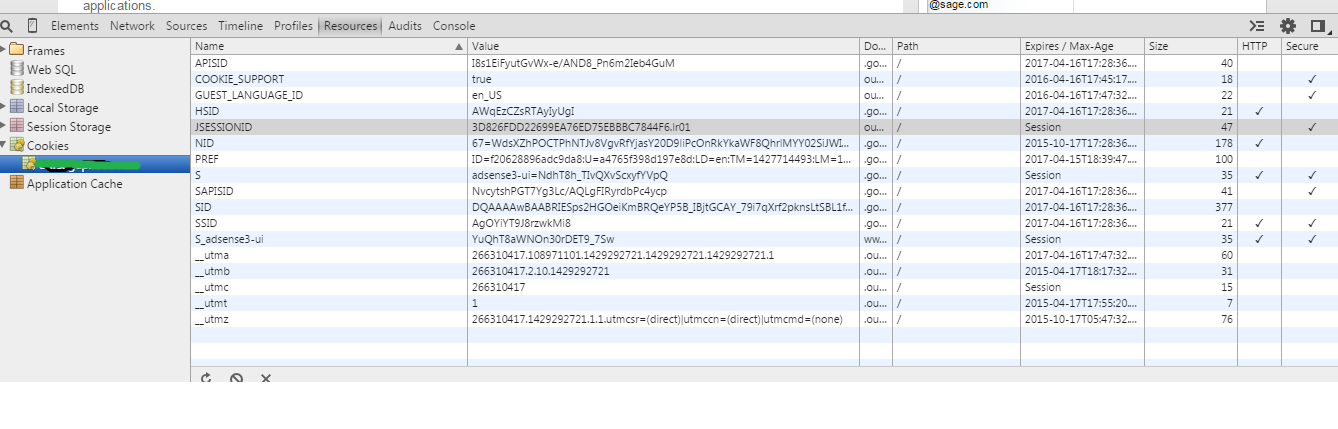
JSESSIONID is a cookie generated by Servlet container like Tomcat or Jetty and used for session management in J2EE web application for http protocol.  Since HTTP is a stateless protocol there is no way for Web Server to relate two separate requests coming from same client and Session management is the process to track user session using different session management techniques like Cookies and URL Rewriting. If Web server is using cookie for session management it creates and sends JSESSIONID cookie to the client and than client sends it back to server in subsequent http requests. This cookie is valid still the browser session is available. We can view this JSessionId in the chrome as If we want this jsession cookie should  be present certain period of time. How can we do it? In liferay  it can be done just by adding the entry in the web.xml Go to the 1. <liferay-path>/tomcat/webapps/ROOT/WEB-INF/  2. Open the web.xml and add the "cookie-config"...

Session TimeOut

In Liferay session timeout will be 30 mins by default. If you were idle for 30 mins liferay will expire the session. Sometimes based on the requirement we want to increase the session timeout. So look into the portal.properties  file and search for the "session.timeout"  we can see the  minutes it was set. By default it was 30 minutes. # # Specify the number of minutes before a session expires. This value is # always overridden by the value set in web.xml. # session.timeout=30 Even if we increase this value it would effect because it will be override the entry in the web.xml . so as best option remove the entry in the web.xml Navigate to the tomcat folder as <tomcat>/webapps/ROOT/WEB-INF/web.xml Search for the entry " session-timeout " you can find the following snippets. 30 Remove this entry in the web.xml and increase the value in the portal-ext.properties to your value, suppose if i need to increase the session t...