Posts

Showing posts with the label userId

Adding Page Template in liferay Programmatically

We know that we can create the page template from the control panel, What if we want to create programmatically. So here we go, 1. We are reterving the page template name form the portlet.properties. If you want to know how to create the portlet.properties and retrieve follow the below link. http://liferaytutorial.blogspot.in/2013/03/how-to-read-values-from-properties-file.html So here i am retrieving the page template name as page.template from portlet.properties file. String pageTemplateNames = PortletProps.get("page.template"); In Portlet. properties page.template = Home,Test Before adding the page template we are checking weather page template exists or not by dynamicQuery , because we don't have any finder method to check the page template by name. Here i am checking by descrition beacause name will be storing as JSON format in DB. List<LayoutPrototype> layoutProtoTypeList = null; DynamicQuery dynamicQuery = DynamicQueryFactoryUti...
Adding Site Template Programmatically

We know that we can create the site template from the control panel, What if we want to create programmatically. So here we go, 1. We are reterving the site template name form the portlet.properties. If you want to know how to create the portlet.properties and reterive follow the below link. http://liferaytutorial.blogspot.in/2013/03/how-to-read-values-from-properties-file.html So here i am reterving the site name as  site.template from portlet.properties file. String siteTemplateNames = PortletProps.get("site.template"); In portlet.properties site.template = SiteTemplate1 , SiteTemplate2 Before adding the site template we are checking weather site template exists for not by dynamicQuery , because we don't have any finder method to check the site template by name. Here i am checking by descrition beacause name will be storing as JSON format in DB. DynamicQuery dynamicQuery = DynamicQueryFactoryUtil.forClass(LayoutSetPrototype.class); dynamicQuery....

How to change the authentication type for login portlet in liferay

Image
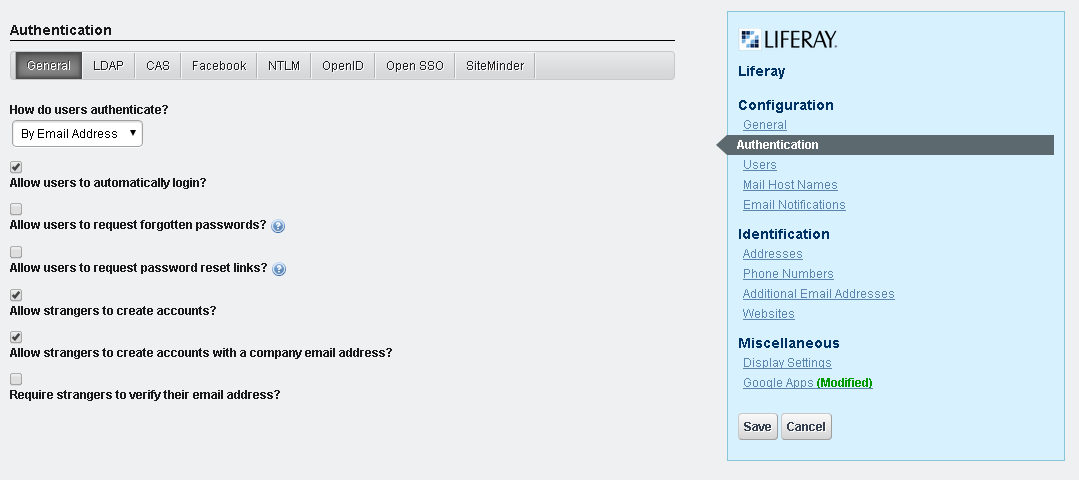
We have 3 options to change the authentication type for login. 1. Go to the controlPanel , navigate to the portal section and click on the portal setting and click on the Authentication right handside as shown in below screen shot.  select the values from the selectbox of " How do users authenticate? " ans click on the save button to save the changes. 2.We can change the properties in the portal-ext.properties as, here i have changed to authenticate by screen name.     #     # The portal can authenticate users based on their email address, screen     # name, or user id.     #     #company.security.auth.type=emailAddress     company.security.auth.type=screenName     #company.security.auth.type=userId 3. Changing the settings of login portlet. Go to page where login portlet is reside and click on the setting icon as shown below. and click on the " configuration " which will nav...