Posts

Liferay Input Move boxes
Image
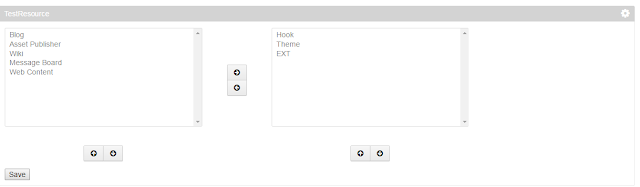
In Liferay we have one more taglib called input-moveboxes , where we can move the items from left to right viceversa. Which can be look like as below, Here the Code, <%@page import="com.liferay.portal.kernel.util.KeyValuePair"%> <%@page import="java.util.ArrayList"%> <%@page import="java.util.List"%> <%@ taglib uri="http://java.sun.com/portlet_2_0" prefix="portlet" %> <%@ taglib uri="http://liferay.com/tld/ui" prefix="liferay-ui" %> <portlet:defineObjects /> <% List<KeyValuePair> leftList = new ArrayList<KeyValuePair>(); leftList.add(new KeyValuePair("1", "Blog")); leftList.add(new KeyValuePair("2", "Asset Publisher")); leftList.add(new KeyValuePair("3", "Wiki")); leftList.add(new KeyValuePair("4", "Message Board")); leftList.add(new KeyValuePair("5", ...

Steps to follow to deploy/undeploy the EXT

As we know that EXT is not hot deployable , we need to restart the server whenever it is deployed. At first time we can deploy the EXT without any prob, but when we need to redeploy or undploying the EXT following things need to be followed. 1. Stop the tomcat server 2. Delete the temp and work folder of tomcat server. It will be reside in the <tomcat-home>. Probably it can as  liferay-portal-6.2.10.1-ee-ga1\tomcat-7.0.42\temp and  liferay-portal-6.2.10.1-ee-ga1\tomcat-7.0.42\work. 3. Make sure to delete the JAR files created when EXT is deployed. All the jar files will be created with name prefix as ext . Jar files will be at <tomcat-home>/lib/ext it can  liferay-portal-6.2.10.1-ee-ga1\tomcat-7.0.42\lib\ext.                 ext-*-ext-service.jar Also it can also be at <tomcat-home>/ROOT/WEB-INF/lib/ probably it can be as  liferay-portal-6.2.10.1-ee-ga1\tomcat-7.0.42\webapps\ROOT\WEB-...

UnderStanding the Resource Permission

This article explains about the basic flow of the resources, how they are applied. 1. Create the Portlet with the Name as "TestPermission" 2. Create service.xml <?xml version="1.0" encoding="UTF-8"?> <!DOCTYPE service-builder PUBLIC "-//Liferay//DTD Service Builder 6.2.0//EN" "http://www.liferay.com/dtd/liferay-service-builder_6_2_0.dtd"> <service-builder package-path="com.service"> <author>Test</author> <namespace>Test</namespace> <entity name="Bus" local-service="true">         <column name="id" type="long" primary="true"></column>         <column name="registration" type="String"></column>         <column name="wheels" type="String"></column>     </entity> </service-builder> Build the services, automatically classes w...

Working with Alloy UI Taglibs

Image
We can use readly avalible taglibs in our customportlet , Here are the some 1. If we want user to rate the content we can use "ratings" taglib as, <liferay-ui:ratings classPK="12724" className="<%=BlogsEntry.class.getName() %>"></liferay-ui:ratings> Here classPK is the  primarykey , here i am using the blogsentry so it is blogsentryid className is the classname of the entry, wheather it is "BlogsEntry" , "JournalArticle" etc. 2. If we want to display the rating score <liferay-ui:ratings-score score="2"></liferay-ui:ratings-score> 3. "Discussion" taglib mostly used to display the user comments <liferay-ui:discussion classPK="12724" userId="10201" className="<%=BlogsEntry.class.getName() %>" formAction="fm"></liferay-ui:discussion> Here classPK is the  primarykey , here i am using the blogsentry so it is...

Service builder exception : org.dom4j.DocumentException: www.liferay.com Nested exception: www.liferay.com

Today, while building an service i got the following exception. Solution:    Since i don't have the internet connection. while building the services i got the below exception.    So remove the DTD from the service.xml   If still you get this exception remove from the other xml files like liferay-display.xml and liferay-portlet.xml DTD will be at lineno:1 or 2 of the service.xml It will look as below <!DOCTYPE service-builder PUBLIC "-//Liferay//DTD Service Builder 6.2.0//EN" "http://www.liferay.com/dtd/liferay-service-builder_6_2_0.dtd"> <service-builder package-path="com.test.sample"> ................ Hope this information helps. com.liferay.portal.kernel.xml.DocumentException: www.liferay.com Nested exception: www.liferay.com at com.liferay.portal.xml.SAXReaderImpl.read(SAXReaderImpl.java:429) at com.liferay.portal.xml.SAXReaderImpl.read(SAXReaderImpl.java:447) at com.liferay.portal.kernel.xml.SAXReaderUtil....

Disabling the Change of password for the user

If we want to disable the change of the password when user is logging into first time, we can follow these 2 steps 1. When the user is creating the my code, i mean if we have written the code for adding the user instead of out of box. then we can set like this . user.setPasswordReset(false); UserLocalServiceUtil.updateUser(user); 2. I think this option we be better, Go to the controlPanel Control Panel -> Password Policies(Portal Section) -> Default Password Policy .-> Change Required (uncheck checkbox). That's it , when user is logging first time, then we cannot get change password screen.

Knowing About the layout

We can Check the page whether it is private or public page using layout object. layout.isPrivateLayout() layout.isPublicLayout() layout is an implict object in liferay By using this "layout" object we can get title , description, theme applied to that page, group, Also we can get the child page and parent page details. Forming the dynamic URL PortalUtil.getPathFriendlyURLPublic() : It retrieves "/web" PortalUtil.getPathFriendlyURLPrivateGroup() : It retrieves "/group" themeDisplay.getScopeGroup().getFriendlyURL(): It retrieves site name(ex: guest) So finally we can write as, If we want Public Page URL: PortalUtil.getPathFriendlyURLPublic()+ themeDisplay.getScopeGroup().getFriendlyURL() +StringPool.SLASH + "home"; It will be as "/web/guest/home. Also If we want Private Page URL: PortalUtil.getPathFriendlyURLPrivateGroup()+ themeDisplay.getScopeGroup().getFriendlyURL() + StringPool.SLASH...