Posts

UnSubscribe the user from the comment

  Whenever we write comment to the post(Blog or webcontent etc..) , user will automatically subscribe to the comments and also will be receving the email when ever any user update or add the comment.   If user want to subscribe manually, it is timetaking to check each and every post.   so here the following code which helps to unsubscribe the user from the post. Here we are unsubscribing the "Admin" user  posts of  JournalArticle.   String screenName = "Admin"; String className = JournalArticle.class.getName(); User user = null; ThemeDisplay themeDisplay = (ThemeDisplay) request.getAttribute(WebKeys.THEME_DISPLAY); try { user = UserLocalServiceUtil.getUserByScreenName(themeDisplay.getCompanyId(), screenName); } catch (PortalException e) { e.printStackTrace(); } catch (SystemException e) { e.printStackTrace(); } if(user!=null) { List<subscription> subscriptionList = null; try { ...
Knowing the cluster Node in the server

Sometimes we need to know which server node we are accessing in cluster environment. We know that we can execute the "Groovy" and "BeanShell" script in control panel. So place the following code and execute it, you will be knowing which server we are accessing. Note: Before execution make necessary imports ClusterNode clusterNode =ClusterExecutorUtil.getLocalClusterNode(); if (clusterNode != null) { System.out.println("cluster Node is "+clusterNode.getClusterNodeId()); }

Deleting the cookies

Sometimes it is required to delete the cookies, where we need to set the MaxAge to 0. Here we are retrieving the cookies from the request, and setting the maxAge to "0" to the response , so that it will expire the cookies. Cookie[] cookies = request.getCookies(); for(Cookie cookie : cookies){ System.out.println("cookie Name is "+cookie.getName()); cookie.setMaxAge(0); response.addProperty(cookie); }

Getting the user password

In Liferay, We know that user password stores in Encrypted format in DB but sometime we have want to know the user password. so what to do?? We have utility method portalUtil.getUserPassword(portalRequest); But it gives null value. So how do we get it? Add the following properties in the Portal-ext.properties and restart the server. session.store.password=true session.shared.attributes.excludes= Then use the portalUtil.getPassword to get the userPassword. Thats it!!!  Now we can view the user password.

Extending the session/jsessionId

Image
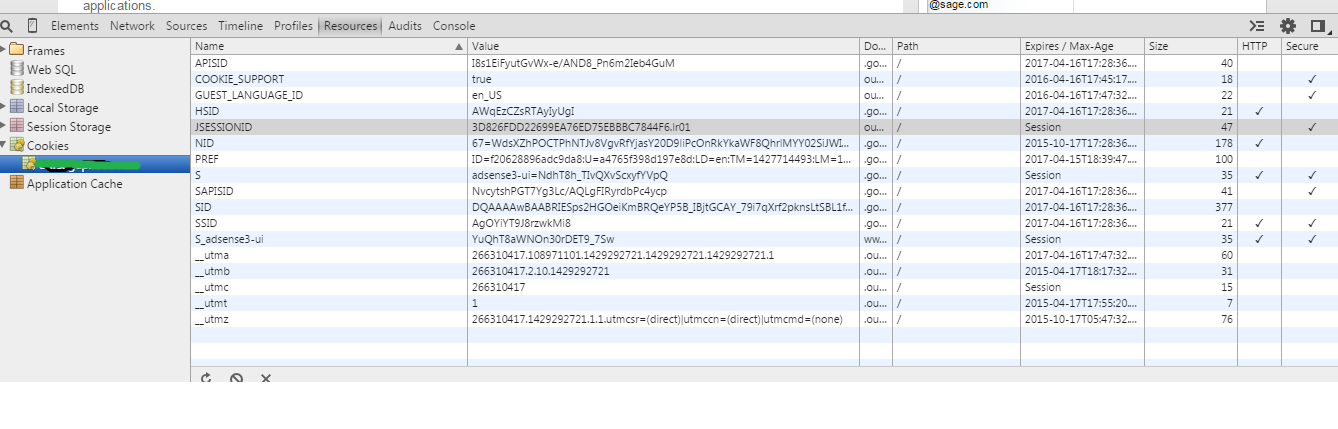
JSESSIONID is a cookie generated by Servlet container like Tomcat or Jetty and used for session management in J2EE web application for http protocol.  Since HTTP is a stateless protocol there is no way for Web Server to relate two separate requests coming from same client and Session management is the process to track user session using different session management techniques like Cookies and URL Rewriting. If Web server is using cookie for session management it creates and sends JSESSIONID cookie to the client and than client sends it back to server in subsequent http requests. This cookie is valid still the browser session is available. We can view this JSessionId in the chrome as If we want this jsession cookie should  be present certain period of time. How can we do it? In liferay  it can be done just by adding the entry in the web.xml Go to the 1. <liferay-path>/tomcat/webapps/ROOT/WEB-INF/  2. Open the web.xml and add the "cookie-config"...

Retrieving/getting the JournalArticle from the Tag

Whenever we create the JournalArticle we add tag. Sometimes it is required to get the "Article" from the tag, so how can we do that. Here is the code, String tagName = "cricket"; AssetTag assetTag = AssetTagLocalServiceUtil.getTag(themeDisplay.getScopeGroupId(),tagName); AssetEntryQuery assetEntryQuery = new AssetEntryQuery(); assetEntryQuery.setAllTagIds(new long []{assetTag.getTagId()}); List<journalarticle> journalArticleList = null; List<assetentry> assetEntryList = AssetEntryLocalServiceUtil.getEntries(assetEntryQuery); for(AssetEntry assetEntry : assetEntryList) { try { JournalArticleResource journalArticleResource = JournalArticleResourceLocalServiceUtil .getJournalArticleResource(assetEntry .getClassPK()); JournalArticle journalArticle = JournalArticleLocalServiceUtil.getArticle(groupId,journalArticleResource.getArticleId()); jou...

Applying the theme , layout and setting the portlets for the Page template programmatically

In previous post we have seen adding the site template and page template programatically . If you want to look into those posts again please follow the links below. Creation of Site Template http://liferaytutorial.blogspot.in/2015/03/adding-site-template-programmatically.html Creation of Page Template http://liferaytutorial.blogspot.in/2015/03/adding-page-template-in-liferay.html Sometimes it required to add the portlet to layout and apply theme programatically. So here is the code, Here we are applying the 2 column layout with 1st column as " MessageBoard (19)" and 2nd column as " Search (3)" and " Blog (33)" portlets Also applying the theme "label_WAR_labeltheme. // Updating the column and Portlets for the pagetemplate LayoutPrototype layoutPrototype = LayoutPrototypeLocalServiceUtil.getLayoutProtoType(10011l); Layout layout = layoutPrototype.getLayout(); LayoutTypePortlet layoutTypePortlet =(LayoutTypePortlet)layout.getL...